Why PG management in Excel stops working as you grow
Most PGs start with a register at the desk or a PG management Excel sheet on the owner's laptop. For ten or fifteen beds, that is fine. You know every resident by name, you remember who paid in cash, and the whole sheet fits on one screen.
Somewhere past thirty or forty beds, the same sheet starts to cost you money, mostly in ways you do not see:
- There are several copies. One on the laptop, one on the manager's phone, a photo of the register in a WhatsApp chat. Nobody is sure which one is right.
- A column per month means the sheet grows sideways until nobody scrolls far enough to see who still owes from August.
- "Paid" is not a receipt. A cell that says paid does not say how much, when, by which method, or to whom.
- Deposits live somewhere else — another tab, another notebook — and nobody adds them up until three people leave in the same month.
- Changes leave no trail. When a number is overwritten, the old one is gone, and so is the answer to "who changed this?"
- You cannot share just part of it. The manager needs to see rent, not your expenses. A resident needs to see their own dues and nothing else.
None of this is anyone's fault. A hostel management spreadsheet was built for one person at one desk, not for an owner, a manager, a warden and sixty residents on their phones.
Signs it is time to move from a spreadsheet to an app
You do not have to switch the day you open. But if three or more of these sound familiar, the register is already costing more than it saves:
- You cannot say, in under a minute, who still owes rent this month.
- A resident has said "I already paid" and you could not prove it either way.
- Your manager calls you to ask what someone's rent is.
- You found out a bed was vacant days after it became free.
- "How much deposit are we holding?" is a question you would have to sit down and work out.
- You run more than one property, or plan to.
The good news is that moving does not mean typing everything again. If your records are already in Excel, most of the work is done.
What to prepare before you import
An import is only as good as the sheet that goes into it. Spend an hour cleaning your PG register before the move, and the move itself takes minutes. These are the columns in StayOne's import template, and what each resident's row needs:
| Column | What to put | Watch out for |
|---|---|---|
| Full name | As it should appear on receipts | Spellings and initials. Fix them now, not on every receipt later. |
| Mobile | The resident's 10-digit mobile number | This is how they sign in. One wrong digit and they cannot get into their account. |
| Room and Bed | The room and the bed they are in | In a shared room, the bed matters as much as the room. Pick both from the template's list. |
| Monthly rent | What this resident actually pays | Leave blank to use the bed's rent. Fill it in for anyone on an older or special rate. |
| Moved in on | The date they really moved in | A real past date, as DD/MM/YYYY — not the date you are importing. |
| Deposit amount | The deposit you hold for them | Check it against your deposit notebook, not memory. |
| Deposit already collected? | Yes if you already hold it | Yes records it without asking the resident to pay again. No raises it as still owed. |
| Outstanding amount | Old dues, only if they genuinely owe you | Leave blank or 0 for everyone who is paid up — that is most people. |
| Bill rent from | The first month to bill, as YYYY-MM | Leave blank if they have paid up to today; billing then starts next month. |
| Emergency contact | Name, mobile and relation | Optional, but it is the number everyone looks for when something goes wrong. |
Two more things to settle before you start:
- Agree the room and bed names. If your register says "Room 1, window bed" and the board will say 101-A, decide now which names you will use from here on, and tell your staff.
- Pick a cut-off day. Import on a quiet day, after most of the month's rent is in, and stop writing in the old register from that day. Two records that both get updated always drift apart.
Step 1: set up your floors, rooms and beds
Residents are imported into beds, so the beds have to exist first. Add your floors, then each room with its sharing type and whether it is AC or non-AC, then the beds in it with their rent. This is usually the slowest part of the afternoon, and you only ever do it once.
Use the names your staff and residents already use. If everyone calls it Room 204, do not rename it 2-D. For more on laying out the board, see our guide to managing PG beds and rooms.
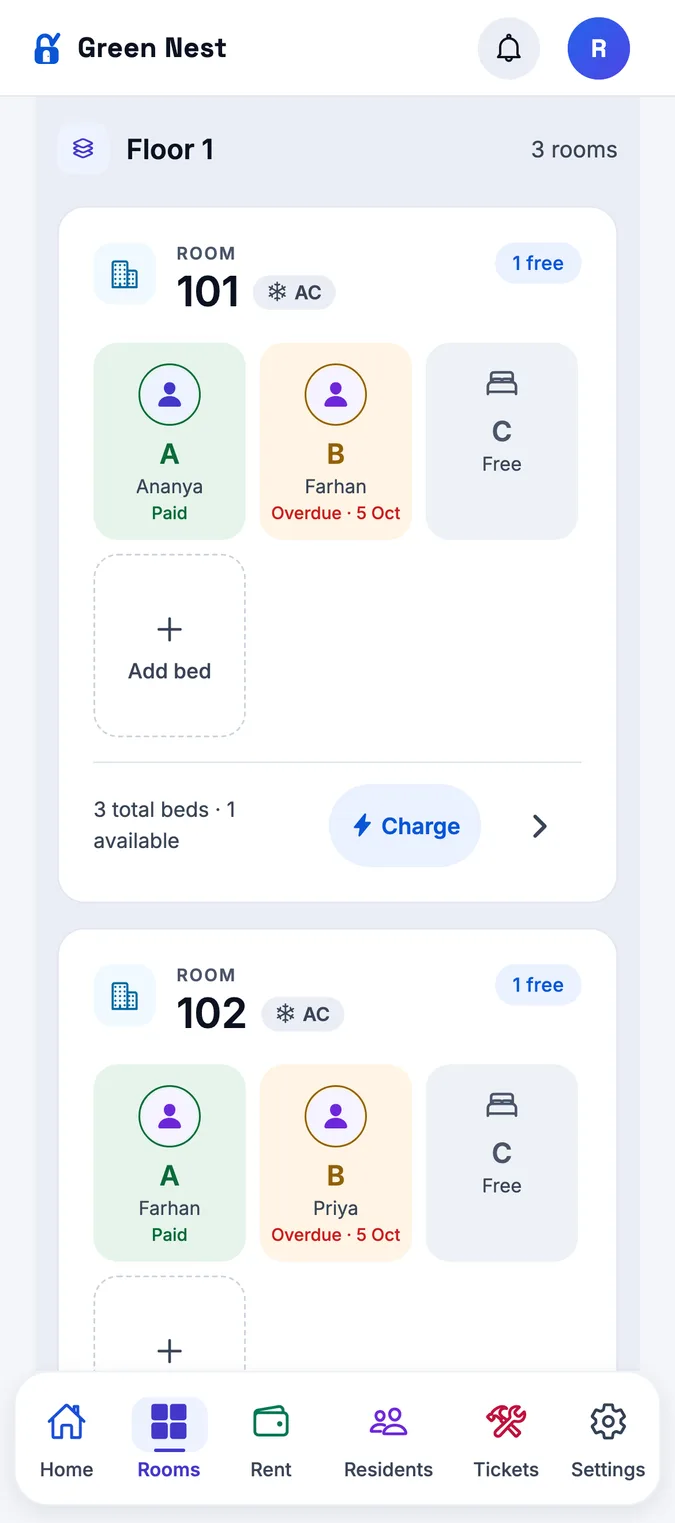
The rooms and beds board shows every floor, room and bed, coloured vacant, occupied, on notice or reserved. Rooms carry their sharing type and AC or non-AC, and StayOne will not let two residents be put in the same bed.
Step 2: import residents from the Excel template
Download the template for your property, copy your residents into it one row each, and upload it. Do not upload your old sheet as it is: the template already knows your rooms and beds, and your old sheet does not.
Copy column by column rather than retyping. Paste names into Full name, numbers into Mobile, and so on. If you track deposits in a separate notebook, this is the moment to bring them into the same row as the resident.
- The Excel (.xlsx) template is made for your property, with your real rooms and beds to choose from.
- Rows with problems — a room or bed that does not exist, a bed that is already taken, the same bed or mobile number on two rows, a shared room with no bed named — are flagged before anything is imported, so you fix the sheet first.
- Each resident goes straight into their bed with their rent and rent day. Deposits come across as held or still owed, and old dues are carried over as a charge on their account.
Step 3: check the import before you tell residents
Before residents start signing in, spend twenty minutes comparing the app with your old records. You are looking for differences, not perfection.
- Occupied beds: does the count match your register? Is any bed showing vacant that has someone sleeping in it?
- This month's rent: does the expected total roughly match what you planned to collect?
- Deposits held: does the total match your deposit notebook? Our guide to PG security deposits explains why this number matters at move-out.
- Old dues: are the residents who owed you money showing the right balance, and is nobody else showing one?
- Five residents, end to end: bed, rent, rent day, deposit and mobile number.
Then tell residents, with a short message in your residents' group: they sign in with the mobile number you have for them and a 6-digit PIN, in any phone browser or the Android app. Ask them to look at their own dues and tell the manager if anything is wrong. Sixty residents each checking their own row is the fastest audit you will ever get.
Step 4: fix mistakes after the import
Something will be wrong. That is normal in the first week on any new system, and it is why you check. The usual problems, and their fixes:
| Problem | Fix |
|---|---|
| Residents came across as paid for this month, but some have not paid | Mark those residents Not received, so this month's rent is billed to them. |
| A resident is in the wrong bed | Move them to the right bed. The old one shows vacant again. |
| Someone was imported who has already left | Undo the move-in, or move them out with a settlement. |
| A payment went against the wrong person | Undo the collection and record it against the right resident. |
| A charge is missing from someone's dues | Add it as a charge on their account. |
Residents brought over as paid for the current month can be marked Not received in one tap — for one person or everyone. They are billed that month's rent, due like everyone else's, and told about it. Owners and managers can also undo collections, write-offs, move-ins and move-outs at any time; receipts are reversed, never deleted, so even a fix leaves a trail.
Your first month after the switch
The real test is the first rent day. Treat the first month as a trial run of the new habits rather than a test of the software:
- Raise every bill at once at the start of the month. Residents imported as paid up start on the month you chose.
- Approve UPI screenshots the same day they come in, and give a receipt for every cash payment at the desk.
- Keep the old register for a month as a backup, but write nothing new in it.
- At month end, compare collected and pending with what you would have expected from the old sheet. If the two disagree, find out why while it is fresh.
Our guide to collecting PG rent on time covers that first month in more detail. The Excel import is part of every StayOne plan, from Lite at ₹999 a month for up to 50 beds — see pricing — and the first month is free. If you would rather not do the move alone, we set up the PG with you.